
mSPDict - English dictionary4.3.1 - Google Play
You'll be able to see results in few seconds.
Publisher Description
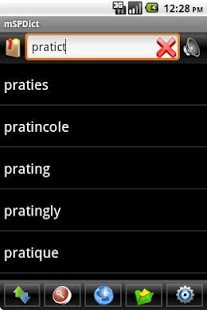
Super Power Dict mobile is an English - English offline dictionary, collects the best open dictionary sources for English with:
- English - English wiktionary (556.063 words): Wiktionary has grown beyond a standard dictionary and now includes a thesaurus, a rhyme guide, phrase books, language statistics and extensive appendices. We aim to include not only the definition of a word, but also enough information to really understand it. Thus etymologies, pronunciations, sample quotations, synonyms, antonyms and translations are included.
- Wordnet (150,000 words): a large lexical database of English. Nouns, verbs, adjectives and adverbs are grouped into sets of cognitive synonyms (synsets), each expressing a distinct concept.
- Real audio voice: wav pronunciation library 170 mb
The powerful of them can be compared with many famous English dictionaries like Oxford, Cambridge, Longman...
Wiktionary can edit and add words at wiktionary.org
Data (please download manual because it is too big - near 200 mb)
http://1drv.ms/QFkduE
Extract and copy mSPDict folder to primary memory (/sdcard/ folder), almost, this is memory card but some mobile like galaxy s, s2, lg optimus 2x... have internal memory, please copy mSPDict to internal memory because /sdcard/ is internal memory path, and if mspdict alert have not data, please copy to all internal and sd card
Tools: convert data, clipboard manager, Mezzofanti
http://code.google.com/p/mspdict/
Features:
- Suggestions
- Data offline
- Lookup many dicts without change
- Spell check
- History and favorite
- Text-to-Speech add support build real voice (mp3 and wav)
- show/hide word mean
- Tablet friendly
- Lookup from reader softs like Moon+ reader, FBReader, Cool reader ... (all softs support colordict)
- Portable, all-in-SD configuration
Support camera OCR (text-recognition):
With Mezzofanti http://code.google.com/p/mspdict/
Or using cam dictionary in Google play (Share via function with mSPDict 2.2 or above, check language: English-English for offline mode).
About mSPDict - English dictionary
The company that develops mSPDict - English dictionary is tienlbhoc. The latest version released by its developer is 4.3.1.
To install mSPDict - English dictionary on your Android device, just click the green Continue To App button above to start the installation process. The app is listed on our website since 2013-09-08 and was downloaded 0 times. We have already checked if the download link is safe, however for your own protection we recommend that you scan the downloaded app with your antivirus. Your antivirus may detect the mSPDict - English dictionary as malware as malware if the download link to tienlbhoc.mspdictenglish is broken.
How to install mSPDict - English dictionary on your Android device:
- Click on the Continue To App button on our website. This will redirect you to Google Play.
- Once the mSPDict - English dictionary is shown in the Google Play listing of your Android device, you can start its download and installation. Tap on the Install button located below the search bar and to the right of the app icon.
- A pop-up window with the permissions required by mSPDict - English dictionary will be shown. Click on Accept to continue the process.
- mSPDict - English dictionary will be downloaded onto your device, displaying a progress. Once the download completes, the installation will start and you'll get a notification after the installation is finished.
Version History
version 4.3.1
posted on 2013-09-08
version 4.2.1
posted on 2013-06-14
Several fixes and updates
Disclaimer
Official Google Play Link
We do not host mSPDict - English dictionary on our servers. We did not scan it for viruses, adware, spyware or other type of malware. This app is hosted by Google and passed their terms and conditions to be listed there. We recommend caution when installing it.
The Google Play link for mSPDict - English dictionary is provided to you by apps112.com without any warranties, representations or guarantees of any kind, so access it at your own risk.
If you have questions regarding this particular app contact the publisher directly. For questions about the functionalities of apps112.com contact us.
